Objects in Disguise 🥷🏽: Unmasking V8’s Secret Operations Behind the Scenes
Introduction
In this article we will explore some ways V8 optimizes your Javascript code. I will share some of the knowledge I have learnt over the past few weeks reading blogs.
Bonus Points!! if you’re interested in using this knowledge to exploit web browsers (for educational purposes, obviously).
The purpose of V8
As web applications become the new normal for many people around the globe. Google set out on a journey to make web browsers run applications as smoothly desktop applications. As a result of this, V8 was born.
V8 is an open source engine used in Google Chrome to execute Javascript code. Its responsible for translating Javascript into machine code directly and also optimizes javascript execution. This engine adapted to a bunch of different strategies to optimizing code behind the scenes.
What are Objects & Properties?
In Javascript an object is basically a hashmap (key-value) pair but with extra features. Lets take a look at a very basic Javascript object.
function Dog(name, age, breed) {
    this.name = name
    this.age = age
    this.breed = breed
}

const d1 = new Dog("Buddy", 3, "Golden Retriever")

// Accessing properties
console.log(d1.name);  // "Buddy"
console.log(d1.age);   // 3
console.log(d1.breed)  // "Golden Retriever"
In this object the properties are name, age and breed.
Hidden Classes
Hidden Classes have multiple different names, some people call them shapes, V8 calls them Maps, in Chakra they are defined as Types and JavascriptCore will call them Structures.
Hidden Classes were created to make accessing property values faster. In languages such as Java, the location of a property can be very easily found through a single instruction. In Javascript, this requires more than just a single instruction. Here is an example of a simple property retrieval from the early days of JavaScript :
[[Get]](P)
When the [[Get]] method of O is called with property name P, the following steps are taken:

1. If O doesn't have a property with name P, go to step 4.

2. Get the value of the property.

3. Return Result(2).

4. If the [[Prototype]] of O is null, return undefined.

5. Call the [[Get]] method of [[Prototype]] with property name P.

6. Return Result(5).
As you can see property retrieval takes quite the number of instructions. For a more modern day algorithm, you can look at this link and scroll down to section 10.1.8 [[Get]] (P, Receiver).
Now you may be wondering how hidden classes make property access faster?
The reality is maps have the capacity to be computationally expensive which can slow down our applications. Through the use of hidden classes we can avoid a dictionary lookup when we access our properties and then combine them with a technique called inline caching (we will discuss this one later).
Lets use our example code to show how hidden classes work:
const d1 = new Dog("Buddy", 3, "Golden Retriever")
const d2 = new Dog("Bruno")
const d3 = new Dog("Milo", 2)
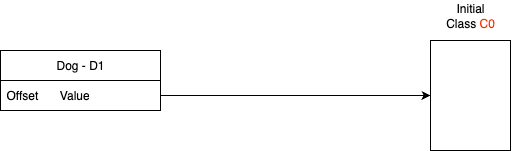
We will start with d1, at the beginning it will point to a empty class.
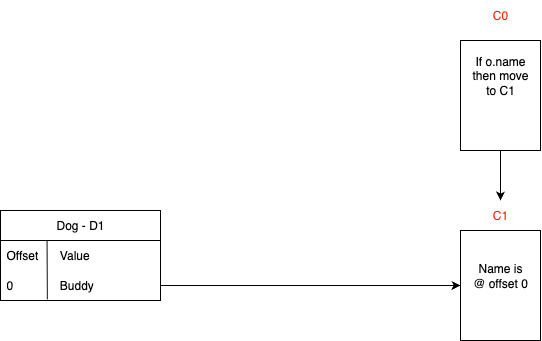
As it processes the values and creates the shapes, it will create a transition diagram from C0 to C1. This essentially means if shape has a name property use C1.
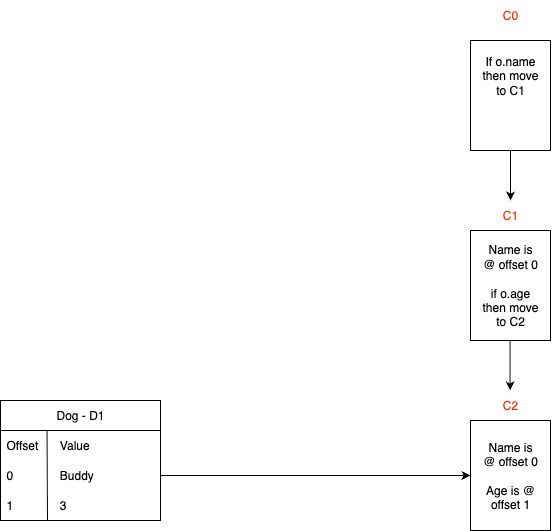
Now what happens when V8 processes the age in our dog? V8 will create another hidden class and make a transition between C1 and C2.
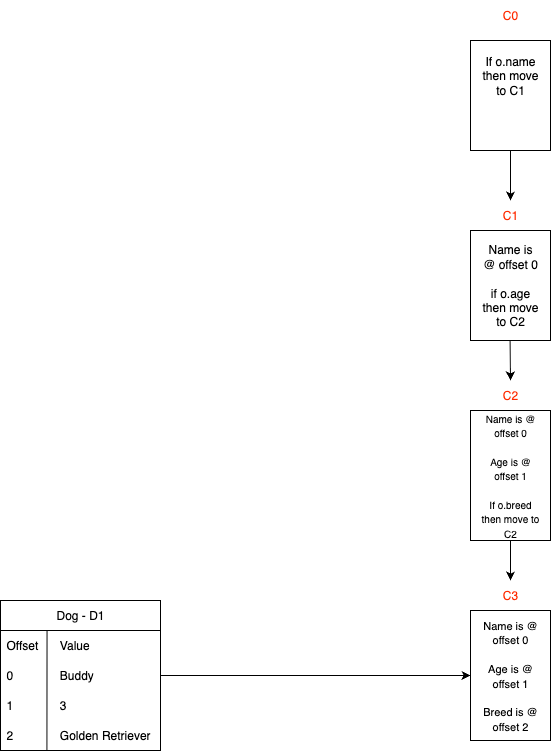
After processing the breed of our dog, the third and the final hidden class will be created.
V8 will then process d2 and d3 from our code above resulting in the final diagram looking like this:
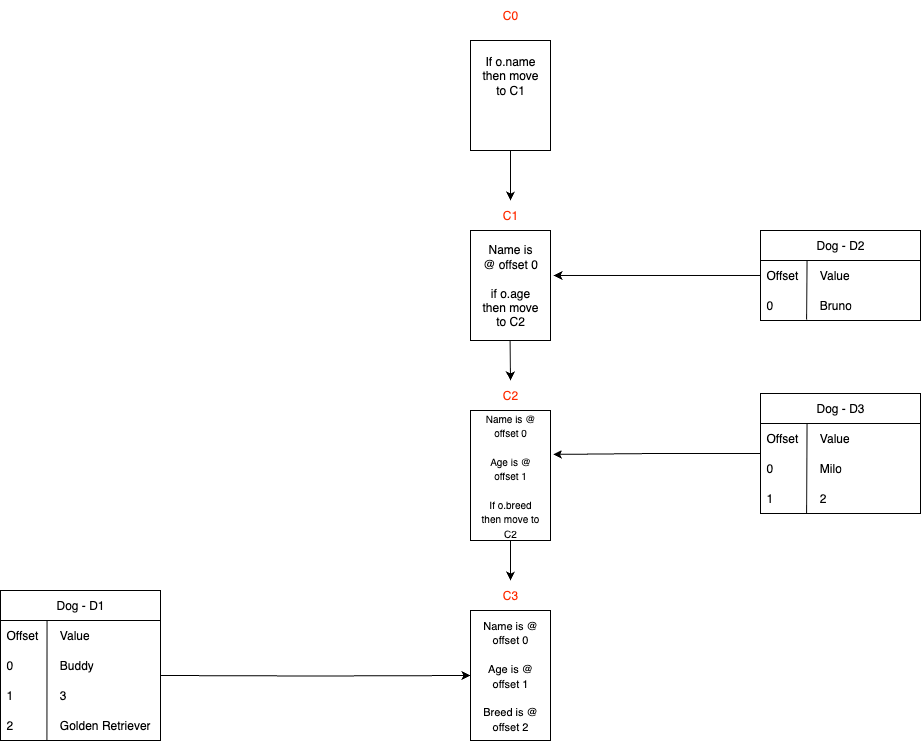
Since we can see the offsets, this strategy avoids a dictionary lookup of the object plus walking through the prototype and its prototypes and then its prototypes etc. Effectively simplifying our algorithm.
Inline Caching
Inline caching is often combined with hidden classes to speed up the lookup process.
Lets use this function this function as an example:
function getName(dog){
    return dog.name
}
The first time we run getName, the method fetches the offset from C3.
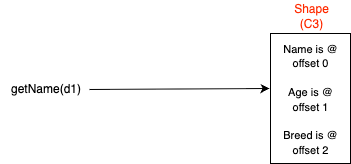
Lets create another object and call it d4.
const d4 = new Dog("Jack", 3, "Labrador")
If we call d4 or object like d4 multiple times using getName(dog), an inline cache will be created. For further understanding, lets expand the function getName into its bytecode.
(base) @MacBook-Air ~ % d8 --print-bytecode --print-bytecode-filter=getName --no-lazy dogs.js
[generated bytecode for function: getName (0x2fd0001997c5 <SharedFunctionInfo getName>)]
Bytecode length: 5
Parameter count 2
Register count 0
Frame size 0
         0x19c9001400b8 @    0 : 33 03 00 00       GetNamedProperty a0, [0], [0]
         0x19c9001400bc @    4 : b3                Return
Constant pool (size = 1)
Handler Table (size = 0)
Source Position Table (size = 0)
Lets replace the getName function with its bytecode to get a better picture.
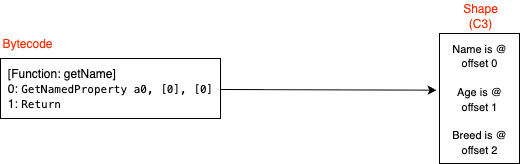
The GetNameProperty will load the first parametera0 as the first argument of the function which in this case is dog. The 0 signifies the argument number, for this example it implies the first argument, if we passed more than one argument then in the bytecode you would see a1....an where n is the number of arguments you passed.
If we keep executing the getName function with the shape C3 from our earlier example, it will remember the offset for dog.name which in this case is 0.
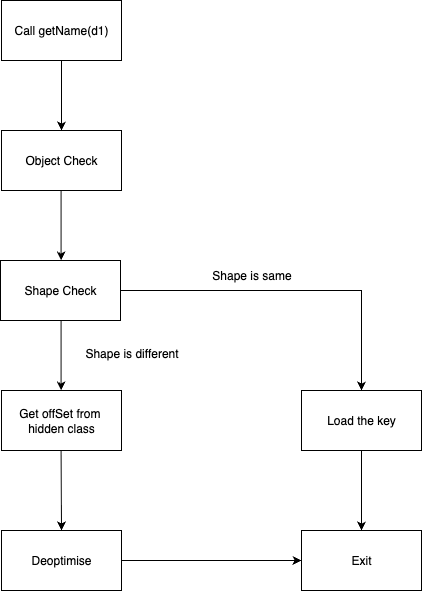
We know from our previous examples that the offset for name is 0. In this case the assumed shape will be C3. For future runs V8 will compare the shape, if the shape is the same then it will used the cached values to speed up the look up process.
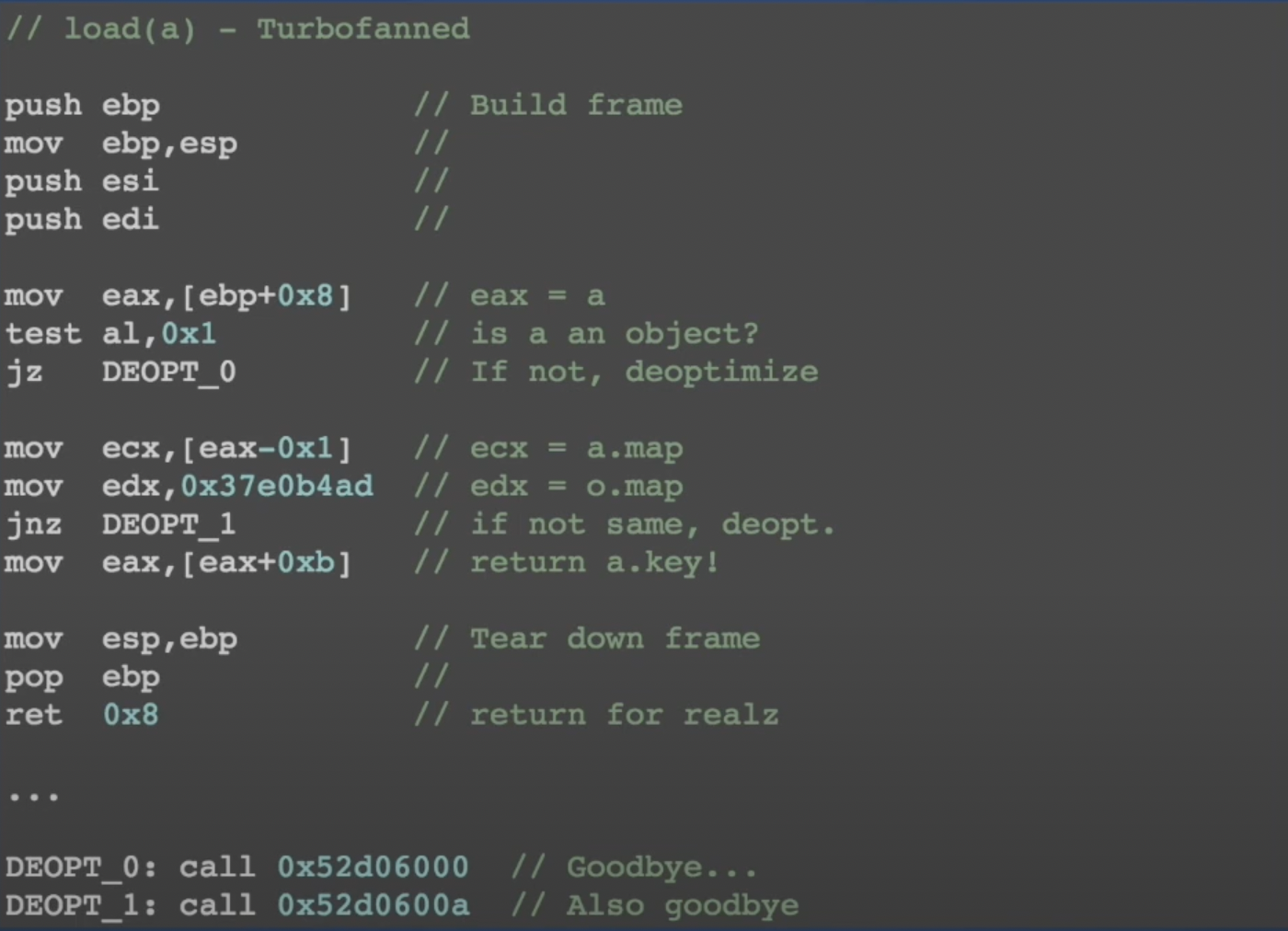
The third argument of GetNamedProperty is another [0] but this one is a feedback vector. A feedback vector is a data structure where the inline cache is stored. Turbofan, V8’s optimizer will run this assembly line, mov eax, [eax + 0xb]. This will return the key for you. Michael Stanton has a good talk about this topic called “V8 and How It Listens to You”.
Here is a visual diagram of the entire process:
If you would like a deeper look, Michael Stanton from Google published this assembly from his talk “V8 and How It Listens to You”:
References:
https://dev.to/_staticvoid/node-js-under-the-hood-8-oh-the-bytecodes-1p6p
https://jhalon.github.io/chrome-browser-exploitation-1/
https://www.youtube.com/watch?v=u7zRSm8jzvA
https://mathiasbynens.be/notes/shapes-ics
https://richardartoul.github.io/jekyll/update/2015/04/26/hidden-classes.html
https://stackoverflow.com/questions/50044735/what-is-a-feedbackvector-in-v8
https://draft.li/blog/2016/12/22/javascript-engines-hidden-classes/
https://javascript.plainenglish.io/v8-engine-and-inline-caching-in-javascript-fef80054a551